Di Like dan Follow Ya Sahabat
Terima Kasih Banyak

Tunggu sampai tombol Like dan Follow muncul


Klik sembarang atau klik tanda silang [x] untuk menutup

Jenis-Jenis Linux

Monday, August 13, 2012

Selamat Pagi sahabat, di pagi yang cerah ini, di penghujung malam ke-26 di bulan Ramadhan, saya akan melanjutkan beberapa materi saya yang tertunda.

Pada sub bab bahasan kali ini saya akan membahas mengenai macam-macam linux. Perlu digaris bawahi bahwa disini saya tidak menerangkan tentang suatu produk Linux, tetapi Macam-Macam linux.

Oke langsung saja, Linux sudah tidak asing lagi di kalangan anak-anak SMK dan Mahasiswa serta Komunitas-komunitas di Indonesia ini tentunya. Banyak produk-produk linux yang mereka gunakan sebagai system aplikasi mereka semua.

disini saya mengkaji dan memilah-milah tentang jenis-jenis linux yang ada didunia. Jenis-Jenis linux adalah  sebagai berikut :

Continue Reading | Komentar

Command Shell Windows

Indoblogger yang setia kali ini saya akan share beberapa command shell dalam windows. OK, Langsung saja.
Berikut adalah beberapa command shell dalam Windows.

ADDUSERS Add or list users to/from a CSV file
ARP Address Resolution Protocol
ASSOC Change file extension associations
ASSOCIAT One step file association
AT Schedule a command to run at a later time
ATTRIB Change file attributes

BOOTCFG Edit Windows boot settings
BROWSTAT Get domain, browser and PDC info

CACLS Change file permissions
CALL Call one batch program from another
CD Change Directory - move to a specific Folder
CHANGE Change Terminal Server Session properties
CHKDSK Check Disk - check and repair disk problems
CHKNTFS Check the NTFS file system
CHOICE Accept keyboard input to a batch file
CIPHER Encrypt or Decrypt files/folders
CleanMgr Automated cleanup of Temp files, recycle bin
CLEARMEM Clear memory leaks
CLIP Copy STDIN to the Windows clipboard.
CLS Clear the screen
CLUSTER Windows Clustering
CMD Start a new CMD shell
COLOR Change colors of the CMD window
COMP Compare the contents of two files or sets of files
COMPACT Compress files or folders on an NTFS partition
COMPRESS Compress individual files on an NTFS partition
CON2PRT Connect or disconnect a Printer
CONVERT Convert a FAT drive to NTFS.
COPY Copy one or more files to another location
CSVDE Import or Export Active Directory data

DATE Display or set the date
Dcomcnfg DCOM Configuration Utility
DEFRAG Defragment hard drive
DEL Delete one or more files
DELPROF Delete NT user profiles
DELTREE Delete a folder and all subfolders
DevCon Device Manager Command Line Utility
DIR Display a list of files and folders
DIRUSE Display disk usage
DISKCOMP Compare the contents of two floppy disks
DISKCOPY Copy the contents of one floppy disk to another
DNSSTAT DNS Statistics
DOSKEY Edit command line, recall commands, and create macros
DSADD Add user (computer, group..) to active directory
DSQUERY List items in active directory
DSMOD Modify user (computer, group..) in active directory

ECHO Display message on screen
ENDLOCAL End localisation of environment changes in a batch file
ERASE Delete one or more files
EXIT Quit the CMD shell
EXPAND Uncompress files
EXTRACT Uncompress CAB files

FC Compare two files
FDISK Disk Format and partition
FIND Search for a text string in a file
FINDSTR Search for strings in files
FOR Conditionally perform a command several times
FORFILES Batch process multiple files
FORMAT Format a disk
FREEDISK Check free disk space (in bytes)
FSUTIL File and Volume utilities
FTP File Transfer Protocol
FTYPE Display or modify file types used in file extension associations

GLOBAL Display membership of global groups
GOTO Direct a batch program to jump to a labelled line

HELP Online Help
HFNETCHK Network Security Hotfix Checker

IF Conditionally perform a command
IFMEMBER Is the current user in an NT Workgroup
IPCONFIG Configure IP

KILL Remove a program from memory

LABEL Edit a disk label
LOCAL Display membership of local groups
LOGEVENT Write text to the NT event viewer.
LOGOFF Log a user off
LOGTIME Log the date and time in a file

MAPISEND Send email from the command line
MEM Display memory usage
MD Create new folders
MODE Configure a system device
MORE Display output, one screen at a time
MOUNTVOL Manage a volume mount point
MOVE Move files from one folder to another
MOVEUSER Move a user from one domain to another
MSG Send a message
MSIEXEC Microsoft Windows Installer
MSINFO Windows NT diagnostics
MSTSC Terminal Server Connection (Remote Desktop Protocol)
MUNGE Find and Replace text within file(s)
MV Copy in-use files

NET Manage network resources
NETDOM Domain Manager
NETSH Configure network protocols
NETSVC Command-line Service Controller
NBTSTAT Display networking statistics (NetBIOS over TCP/IP)
NETSTAT Display networking statistics (TCP/IP)
NOW Display the current Date and Time
NSLOOKUP Name server lookup
NTBACKUP Backup folders to tape
NTRIGHTS Edit user account rights

PATH Display or set a search path for executable files
PATHPING Trace route plus network latency and packet loss
PAUSE Suspend processing of a batch file and display a message
PERMS Show permissions for a user
PERFMON Performance Monitor
PING Test a network connection
POPD Restore the previous value of the current directory saved by PUSHD
PORTQRY Display the status of ports and services
PRINT Print a text file
PRNCNFG Display, configure or rename a printer
PRNMNGR Add, delete, list printers set the default printer
PROMPT Change the command prompt
PsExec Execute process remotely
PsFile Show files opened remotely
PsGetSid Display the SID of a computer or a user
PsInfo List information about a system
PsKill Kill processes by name or process ID
PsList List detailed information about processes
PsLoggedOn Who's logged on (locally or via resource sharing)
PsLogList Event log records
PsPasswd Change account password
PsService View and control services
PsShutdown Shutdown or reboot a computer
PsSuspend Suspend processes
PUSHD Save and then change the current directory

QGREP Search file(s) for lines that match a given pattern.

RASDIAL Manage RAS connections
RASPHONE Manage RAS connections
RECOVER Recover a damaged file from a defective disk.
REG Read, Set or Delete registry keys and values
REGEDIT Import or export registry settings
REGSVR32 Register or unregister a DLL
REGINI Change Registry Permissions
REM Record comments (remarks) in a batch file
REN Rename a file or files.
REPLACE Replace or update one file with another
RD Delete folder(s)
RDISK Create a Recovery Disk
RMTSHARE Share a folder or a printer
ROBOCOPY Robust File and Folder Copy
ROUTE Manipulate network routing tables
RUNAS Execute a program under a different user account
RUNDLL32 Run a DLL command (add/remove print connections)

SC Service Control
SCHTASKS Create or Edit Scheduled Tasks
SCLIST Display NT Services
ScriptIt Control GUI applications
SET Display, set, or remove environment variables
SETLOCAL Begin localisation of environment changes in a batch file
SETX Set environment variables permanently
SHARE List or edit a file share or print share
SHIFT Shift the position of replaceable parameters in a batch file
SHORTCUT Create a windows shortcut (.LNK file)
SHOWGRPS List the NT Workgroups a user has joined
SHOWMBRS List the Users who are members of a Workgroup
SHUTDOWN Shutdown the computer
SLEEP Wait for x seconds
SOON Schedule a command to run in the near future
SORT Sort input
START Start a separate window to run a specified program or command
SU Switch User
SUBINACL Edit file and folder Permissions, Ownership and Domain
SUBST Associate a path with a drive letter
SYSTEMINFO List system configuration

TASKLIST List running applications and services
TIME Display or set the system time
TIMEOUT Delay processing of a batch file
TITLE Set the window title for a CMD.EXE session
TOUCH Change file timestamps
TRACERT Trace route to a remote host
TREE Graphical display of folder structure
TYPE Display the contents of a text file

USRSTAT List domain usernames and last login

VER Display version information
VERIFY Verify that files have been saved
VOL Display a disk label

WHERE Locate and display files in a directory tree
WHOAMI Output the current UserName and domain
WINDIFF Compare the contents of two files or sets of files
WINMSD Windows system diagnostics
WINMSDP Windows system diagnostics II
WMIC WMI Commands

XCACLS Change file permissions
XCOPY Copy files and folders
Continue Reading | Komentar

Pengembangan Linux

    Perbedaan utama antara Linux dan sistem operasi populer lainnya terletak pada kernel Linux dan komponen-komponennya yang bebas dan terbuka. Linux bukan satu-satunya sistem operasi dalam kategori tersebut, walaupun demikian Linux adalah contoh terbaik dan terbanyak digunakan. Beberapa lisensi perangkat lunak bebas dan sumber terbuka berdasarkan prinsip-prinsip copyleft, sebuah konsep yang menganut prinsip: karya yang dihasilkan dari bagian copyleft harus juga merupakan copyleft. Lisensi perangkat lunak bebas yang paling umum, GNU GPL, adalah sebuah bentuk copyleft, dan digunakan oleh kernel Linux dan komponen-komponen dari proyek GNU.

Sistem Linux berkaitan erat dengan standar-standar POSIX, SUS, ISO dan ANSI. Akan tetapi, baru distribusi Linux-FT saja yang mendapatkan sertifikasi POSIX.1.

Continue Reading | Komentar

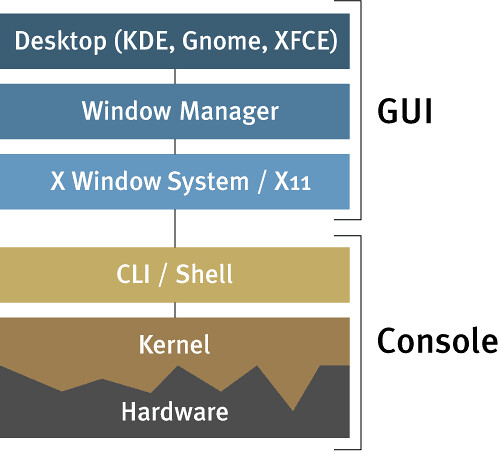
Arsitektur Sistem Operasi Linux

Sunday, August 12, 2012

Hai sahabat blogger, 10 hari terakhir di Ramadhan ini saya akan melanjutkan tentang sub bab yang membahas tentang sistem operasi linux.
Pada bahasan kali ini saya akan membahas tentang arsitektur sistem operasi linux. Oke silahkan menikmati kajian di bawah ini. :)

Seperti halnya semua sistem operasi pada umumnya Linux memiliki konsep  sama dalam hal arsitektur. Perbedaanya adalah bentuk disetiap komponen  pada arsitektur tersebut. Komponen pada arsitektur sistem operasi
Linux adalah sebagai berikut :

Continue Reading | Komentar

Sejarah Linux

Saturday, August 11, 2012

Bahasan ini akan membahas tentang bagaimana sich asal mula linux tercipta. dan apa yang melatar belakangi adanya system operasi linux ini.

Oke Cekibrot mas bro ..!!!

Linux adalah nama yang diberikan kepada sistem operasi komputer bertipe Unix. Linux merupakan salah satu contoh hasil pengembangan perangkat lunak bebas dan sumber terbuka utama. Seperti perangkat lunak bebas dan sumber terbuka lainnya pada umumnya, kode sumber Linux dapat dimodifikasi, digunakan dan didistribusikan kembali secara bebas oleh siapa saja.

Continue Reading | Komentar

Linux Operating System

Hai Indo Blogger, kali ini saya akan memberikan beberapa pengetahuan dasar tentang sebuah system yang dinamakan dengan Linux.

Untuk lebih memahami apa itu yang disebut dengan Linux maka disini saya membagi beberapa bahasan mendasar dan membagi dalam beberapa bab.
Kenapa di bagi lagi bahasannya ? Yah kenapa tidak, begitu banyak dan sangat detail tentunya untuk memahami sesuatu, jadi alangkah baiknya saya bagi menjadi beberapa sub bab, yang setiap bab nya membahas secara utuh dan detail.

Berikut adalah beberapa sub bab yang akan kita bahas :

1.  Sejarah Unix / Linux
2. Arsitektur Perangkat Lunak
3. Pengembangan Linux
4. Jenis-Jenis Linux
5. Instalasi
6. Tips & Trik

Continue Reading | Komentar

Di Like dan Follow Ya Sahabat
Terima Kasih Banyak

Tunggu sampai tombol Like dan Follow muncul


Klik sembarang atau klik tanda silang [x] untuk menutup

Customer Service

 
Support : Creating Website | Designer By : Nic'z Nv Aria Copyright © 2013. Blog Open Source - All Rights Reserved
Template Modify by Zerotea News Inspired Wordpress Hack
Proudly powered by Google